Symphony battery replacement revisited

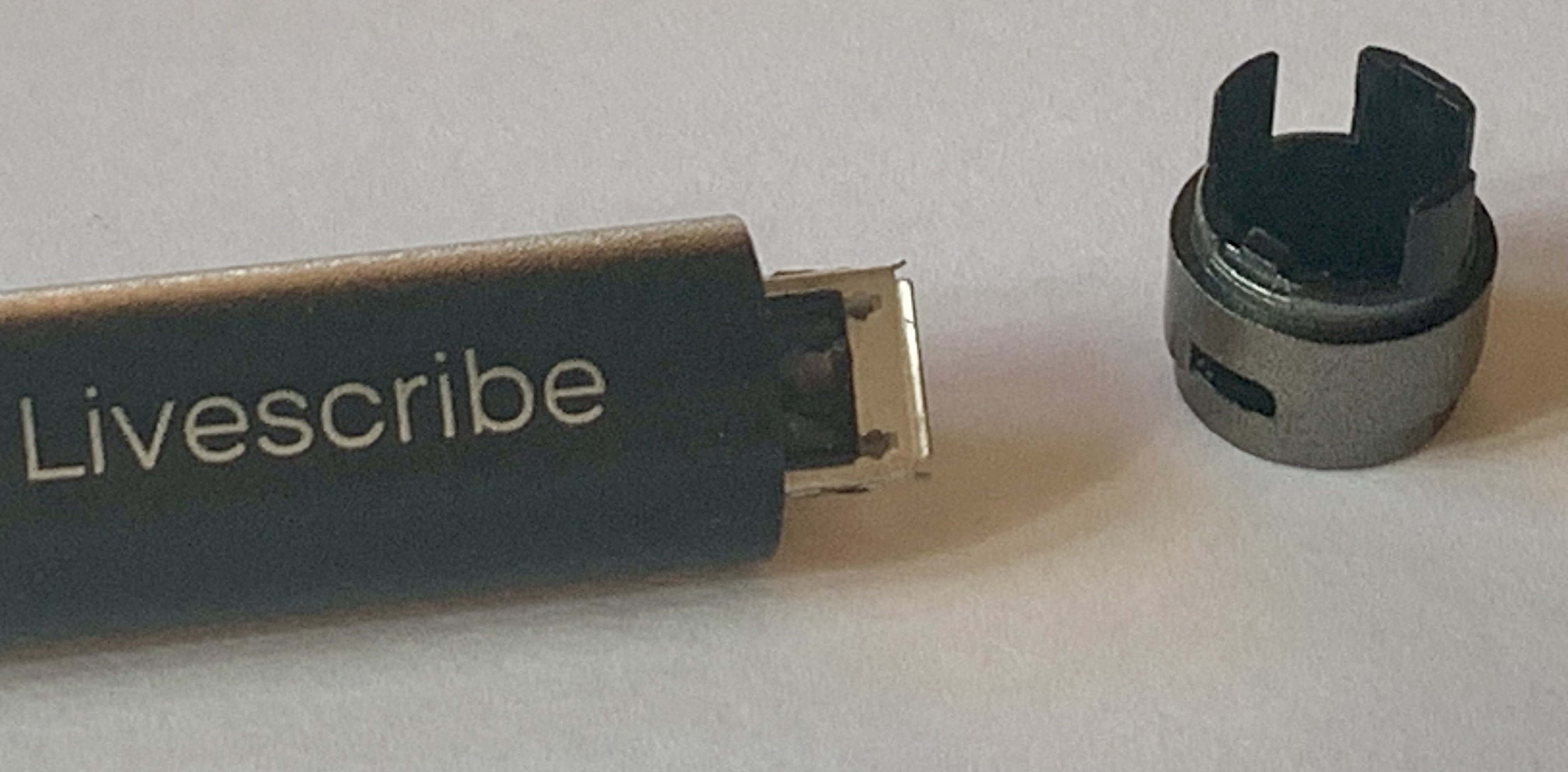
I’ve encountered a couple of Livescribe Symphony pens that were very difficult to open. The end of the pen with the lanyard hole seems to have been glued in place during manufacturing. I thought I could double up on the ties I was using to pull the cap out via the lanyard hole. Well, that little bit of plastic suddenly let loose, and I was left with a damaged end cap.

I have been trying to pry the end cap loose after wrapping it to protect the plastic from the jaws of my pliers. I know, I told y’all not to use pliers. And for good reason, now the cap with the busted lanyard loop has vertical ‘bite’ marks from my pliers. Not good. But I was able to open it and replace the battery. Luckily, I had an ‘extra’ end cap that I could swap for the mangled one.

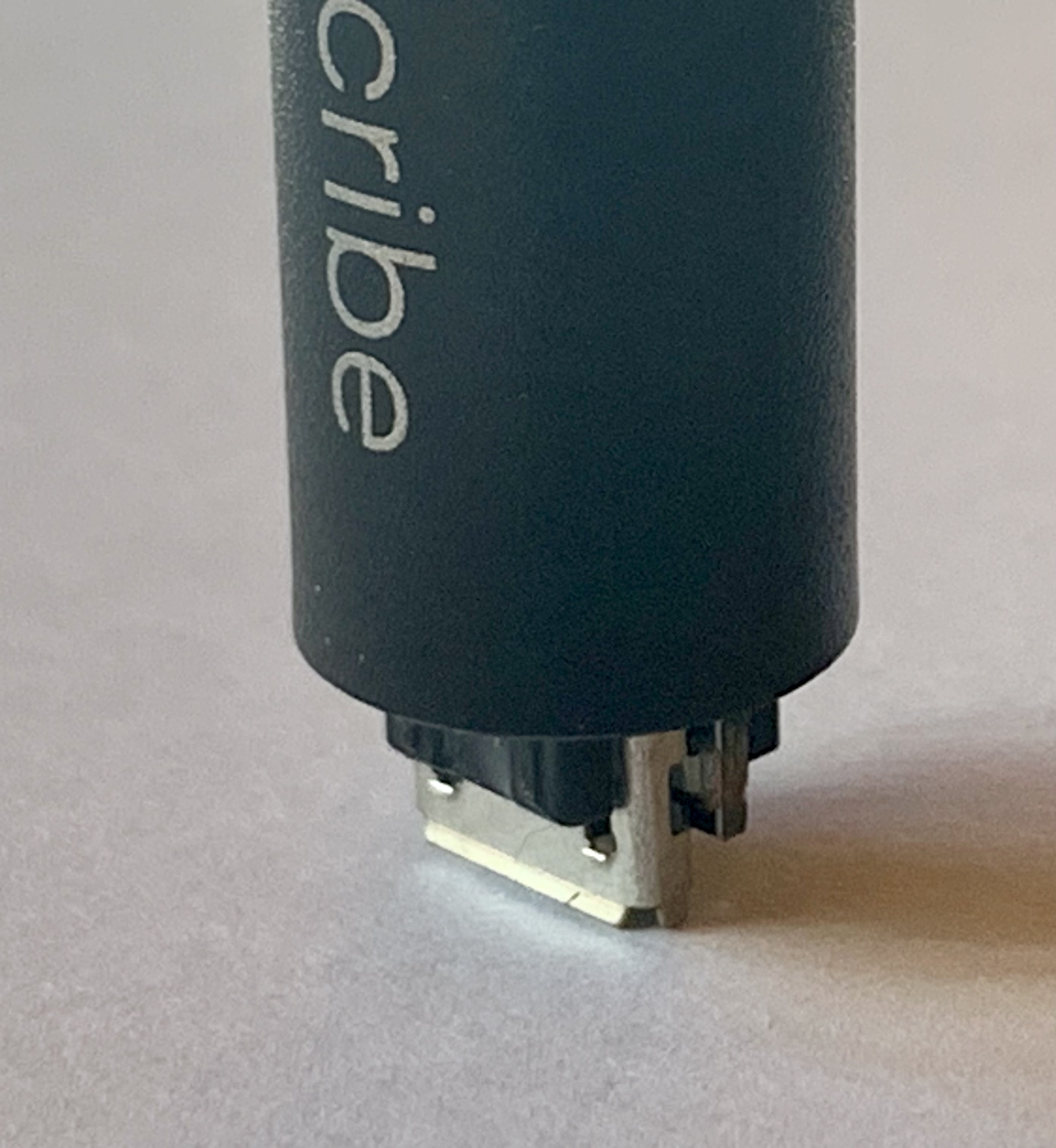
Here’s what I do now. I’ve drilled a hole that just fits the end of the Livescribe Symphony pen. It’s just a piece of scrap pine, 1 cm thick. I’m now able to insert the end cap into this ‘tool’, and I can apply pressure to wiggle the end cap. With the lanyard hole at twelve o’clock (so the micro USB looks like it’s smiling), I can use some torque directly towards six o’clock. And then I’ll switch directions by 180 degrees so that I’m applying pressure from six o’clock to twelve o’clock.

I finally got aggressive enough that I heard a ‘crack.’ I think that this is the adhesive letting go. I slowly increased the pressure to carefully get to that point. After the ‘crack,’ I’m able to wiggle the cap enough to remove it. No broken lanyard loop, no plier marks! I’ve used my ‘tool’ on several old Symphony pens that won’t take a charge. I think that it was fortunate that my scrap was pine, not oak, because now the hole is a little elongated, which seems to make it more useful.

As always, it always helps to have the ‘right tool for the job.’ Sometimes it just takes a bit to figure out what that tool actually is…

Got the following message from Annie, “I found that twisting it back and forth was much more effective to break the glue bond and remove the cap than trying to pull the cap straight off. But I, too, have some damage on the end cap, even though I had a layer of tissue between the pen and the slip joint pliers I used.” (2025-11-19) Thanks Annie!
Replacement batteries for Livescribe Symphony pens are available from me on eBay

If you are on eBay, you can just search for ‘Livescribe battery’ and my listing ought to be the first one that you see. If you want a link, you can use this one: https://www.ebay.com/sch/i.html?_nkw=livescribe+battery&_sacat=0&_from=R40&_trksid=p4432023.m570.l1313

Right now, it’s $17.95 per battery. I’m charging $1.95 for domestic shipping by USPS ground because shipping is a little more involved for lithium-ion batteries. Look at the pictures that I’ve posted with the listing for an idea of how to replace the battery. Of course, you ought to look at the previous post with its pictures and narrative as well.

I hope our batteries will help bring your Livescribe Symphony pen back from the dead!

Well, the replacement batteries ought to, if your pen died because the battery no longer takes a charge. Did I mention we’re supposed to charge our Symphony pens using a USB port on a computer or laptop? I guess the USB power hubs can damage the circuits…

PS. Looking back at my earlier post, I see that I didn’t go into the saga about finding replacement batteries. Long story short, there are commercially available batteries, but the ones that I found were wired up backwards. I got a hold of the manufacturer and asked if they could reverse the wiring so that they would be plug-and-play with Livescribe Symphony pens. They said, ‘Of course, we can do anything you want, if you pay us to! And by the way, there is a minimum order…’ Well, I bit the bullet and ordered, hoping that I wasn’t the only one who needed to replace batteries in the Symphony pens.

Do you have a ‘dead’ Symphony pen? can you open it without destroying it? I found out how.

This has been happening to me a lot recently (within the last couple of years). I go to charge a Symphony pen (one that I’ve been using or one from a small lot of Symphony pens that I purchased a few years ago) and on plugging into the USB socket, nothing happens. No ‘beep,’ no glimmer of light from the LED, it just sits there. So like many of you, I leave it plugged in, hoping that somehow the battery will start to take a charge so that the pen can come back to life. Alas, no happiness.

This was a problem. Especially since I had hoped to sell the Symphony pens that I’d purchased. Clearly, smartpens have a shelf life; specifically, their batteries have a shelf life. This might not be a problem if you regularly or even irregularly charge your Symphony pen or your Aegir pen or your Echo pen. If you let a lithium battery sit long enough without charging, it will die and never accept a charge again.

One of my graduate students was complaining that his Symphony pen would no longer accept a charge. Well, this was a motivating factor to try to figure out where to get replacement batteries. Livescribe doesn’t sell them. No third party seemed to advertise that their batteries fit Livescribe pens. I was going to have to look at the battery before I’d have enough information to actually search for a replacement battery.

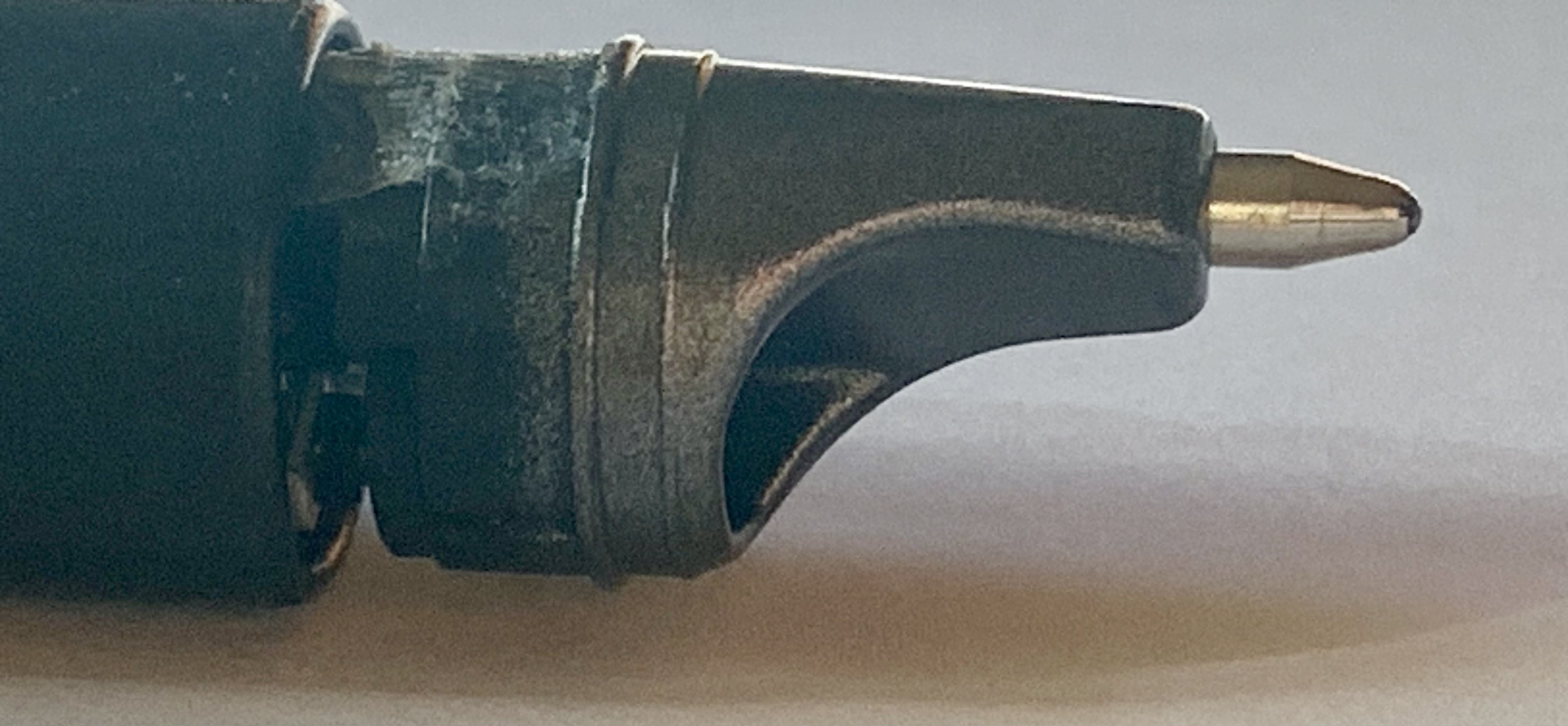
It took a bit before I could reliably open a Symphony pen without grossly defacing it. Do not try to do this with vice-grips or pliers with cloth wrapped around the grippy ridges – you will put claw marks into the soft plastic that makes up the barrel and the end plug! You can move the plug on the USB end back and forth with your fingers to loosen it. Once loosened, it will pull straight off. It’s just there to protect the USB socket. Don’t try to remove the facia surrounding the tip of the refill. It doesn’t really detach from the innards of the pen. Remarkably, the guts of the pen are kept from sliding out of the barrel by the plug (which you’ve removed) and by some double-sided tape that grabs the barrel and the working parts of the pen. If you gently press the USB socket into the tabletop, straight up and down, mind you! The double-sided tape will eventually let go of the barrel, and you can pull the working parts of your Livescribe Symphony straight out!

Here are some pictures. (Sorry that the lighting is so horrible. I don’t have a proper setup for taking shadow-less pictures.)

Here is the end of the Symphony pen after using my fingers to wiggle the end cap free.

You can pull the plastic cap straight off, exposing the USB connector. Yes, the cap has three prongs; nothing is broken here!

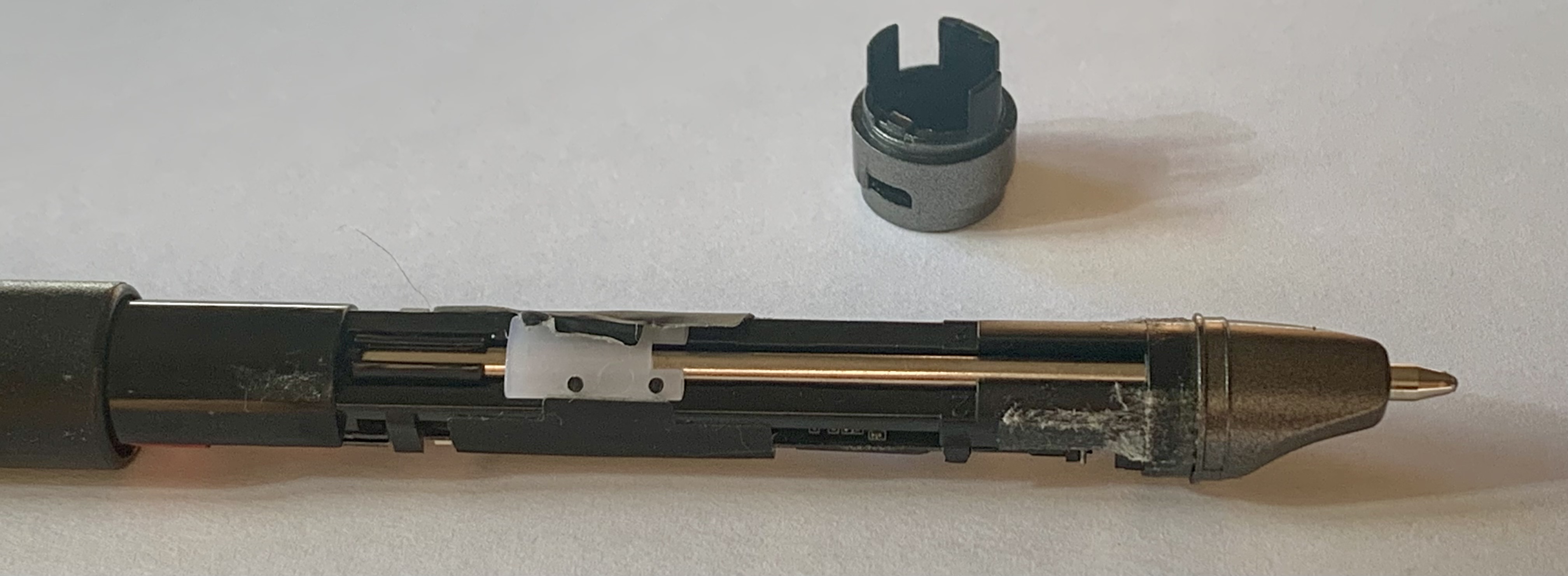
Hold the Symphony pen straight up and down and gently press down. This will force the pen innards out of the other end of the barrel. You can see the double-stick tape that was holding everything together.

At this point, grab the working end of the pen and pull it straight out of the barrel. You will have the working bits out now. There is a lot of tape holding things in place. The LED is under the white plastic housing, and you can see the ballpoint pen refill. On the other side, you see the colored wires going from the battery (under the red tape) up to the JST connector (hidden under the black tape).

Now, to figure out the battery situation… to be continued.

Smooth-writing purple ink refills

We’ve got purple ink refills over at our website (www.mylabmaker.com)

Both fine tip and medium tips (0.8 mm and 1 mm) in both the Echo length (57 mm) and the longer version that fits the Livescribe 3/Aegir/Symphony pens. I really like how these refills write, the purple is a nice color. Check them out at our main site. My WordPress skills have gathered some dust, I’m not up to coding the PayPal links here on the blog for the new refills quite yet.

Happy Holidays!

Wow, I’ve been neglecting the blog. Don’t worry though! We’re still providing the Livescribe community a source of smooth-writing generic refills for Livescribe Echo (57 mm long) and Livescribe 3/Aegir/Symphony pens (67 mm long).

Look for us on Amazon or eBay. Just search ‘Generic Refills Livescribe’ and we ought to be your top hit. My sales handle is ‘GenericRefills’ on both of those sites. You can also order on this wordpress site or at our http://www.mylabmaker.com website! If you order here or at http://www.mylabmaker.com you will save us a little on commissions. In return, I’ll include a free sample for you 🙂

Looking forward to the new year!

Generic Refills

March Madness!

Did you record your NCAA men’s basketball tournament bracket in your Livescribe notebook? I bet the guy that picked all the winners up to the start of the sweet sixteen (the odds of that are staggering!) could have had lots to record for each game if he’d used a Livescribe pen!

Just a quick post to let you know that we have all our refills in stock (except the Japanese gel ink refills) and ready to ship!

PS. my bracket was pretty busted after the first weekend, no need to record it for history.

Green German ink & Japanese Gel ink refills are on their way!

I’ve had so many requests for new colors of ink! It was hard to narrow it down but we’ve got Green German ink refills coming for the Livescribe Pulse/Echo/Sky (57mm), as well as Black Japanese Gel Ink refills for the Pulse/Echo/Sky (57mm).

The Gel ink refills write very nice! but have so little ink in them. I personally would only use them to annotate notes that I’ve already taken or for drawing diagrams. Of course, you are welcome to use them however you see fit! Just be forewarned that you won’t get very many pages with them! The samples let me transcribe a good bit of the Constitution of the United States of America but not much more. I’ll let you know how the production model works out.

Nothing new for the Livescribe 3 yet.  What would you like to see? medium tips? new colors? gel ink (with the caveat that there probably isn’t enough ink in them to be practical for everyday writing). Let us know in the comments!

Warranty replacement on its way!

So Livescribe is sending me a new Livescribe 3 to replace my Sky with the dead OLED display. No charge, and they’re using FedEx. No fuss, no muss.

I wonder now, if I should have taken the other option, a new Echo. I could have taken the display from the new pen and swapped it into my Sky. Well, I’ve made my decision so no looking back! Lets put the new Livescribe 3 through its paces and see how it works with my (new to me) iPhone 6+. The big display should help a lot!

Livescribe OLED displays have 2 year warranty!

OK, good news for me! and maybe new news for you: Livescribe provides a 2 year warranty on OLED displays of recently purchased Livescribe Echo (and the discontinued Sky) pens.  I received an email from Livescribe telling me that my Sky wifi pen was nearing the end of its first year (on Dec 12th), and that the warranty for the pen was 1 yr, except for the OLED display, which is warrantied for 2 years.

Waiting to see what the warranty will provide and if I will have to pay anything for the service. I’d sure like to keep using the Sky wifi, even though I did just upgrade to the iPhone 6 Plus, just in case I switch over to using my Livescribe 3 for everyday notes.

Be sure to come back tomorrow!

Livescribe OLED woes, continued…

My newest Sky wifi pen has been with me for less than a week, and the OLED display is now barely visible. This was a used pen purchased on eBay so I can’t say for certain how long the display has been used.

I have to say, this OLED display issue is giving me fits! I love how the Sky is integrated with Evernote. The wifi sync is nice but not totally needed since I dock my pen every night to charge so I sync using Livescribe Helper.

There is not a lot of information about repair of these displays on the internet. It seems that the OLED display is a proprietary 96 x 16 pixels instead of the more commonly found 96 x 18 displays. The Sky display has a ribbon connector with 10 pads, and of course, this is not very common either. It makes swapping in a new display problematic at best. Someone has reported that the chip that drives the display is labelled, “SSD1305” so it might be possible to figure how to drive a display with 10 pins: most have 14 or more pin outs.

There is some information about swapping your dead display with a working display – but it requires finding a working display. eBay does have some Echo and Sky pens for sale for parts but you aren’t guaranteed getting a live display, let alone a live display with a lot of life left in it!

A word of caution: I purchased a pen on eBay that was branded Livescribe Echo on the front, and Sky on the back. It didn’t work with Livescribe Helper (which is meant for the Sky) but it did seem to talk to the activation server at Livescribe so its probably an Echo in a mismatched case. Another pen I bought on eBay was labelled, “Echo wifi” and that didn’t make any sense at all so I returned it.

I do have a brand new Echo purchased directly from Livescribe. I’m tempted to swap its display for my Sky. As I’ve mentioned before, my soldering skills are weak at best, and the contacts on the display ribbon are tiny!

I’m going to try to live with this display-less Sky for now. At least it was working long enough for me to write down it’s mac address, and verify that it could join the wifi network at work. Not sure how I’ll select networks in the future since the display is so dim… more aggravation to come.

Happy Day of the Dead.